
Download Keyword Explorer by Moz – Free Trial, Accurate SEO Keyword Research Tool
Keyword Explorer by Moz is a powerful research‑focused SEO tool that lets marketers, content creators, and digital analysts uncover high‑value search terms with confidence. Backed by Moz’s extensive index and a claim of 95 % keyword accuracy, the platform streamlines the process of finding relevant phrases, estimating traffic potential, and assessing competition. While the service offers a generous 30‑day free trial for researchers, the full version unlocks advanced metrics, custom reporting, and integration with other Moz products. Whether you’re planning a new blog post, launching an e‑commerce store, or conducting academic research on web trends, Keyword Explorer provides the data you need to make informed decisions quickly and securely.
Core Features & Benefits
- 95 % Accuracy Score: Proprietary algorithms deliver highly reliable search volume estimates, reducing guesswork.
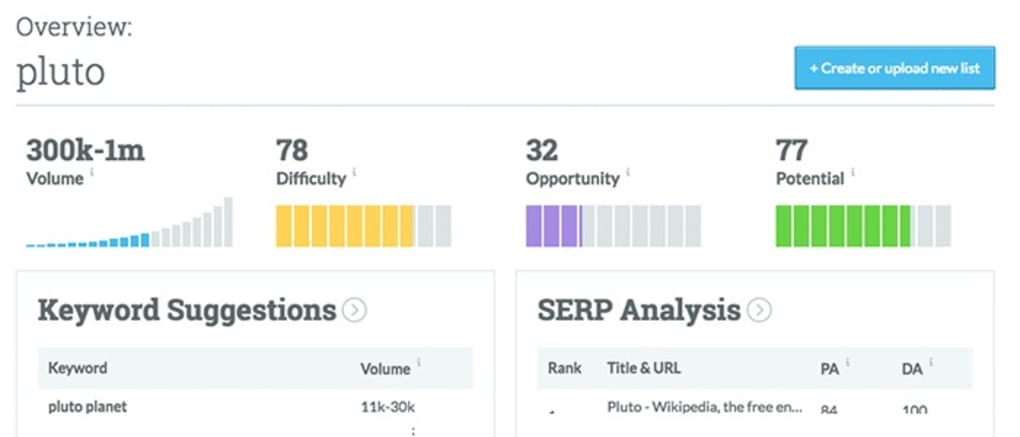
- Keyword Difficulty Metric: Instantly see how hard it will be to rank for each term.
- SERP Analysis: Visual snapshots of the top 10 results, including domain authority and backlink count.
- Priority Score: A single, easy‑to‑interpret rating that combines volume, difficulty, and click‑through potential.
- Keyword Suggestions: Generate hundreds of related terms based on seed keywords, location, and language.
- Export Options: CSV, Excel, and Google Sheets integrations for seamless reporting.
- Custom Lists & Alerts: Save favorite keywords and receive email notifications when metrics change.
- Free 30‑Day Trial: Full access to premium features for a month, no credit card required.
Each feature is designed to accelerate the research workflow. For example, the Priority Score condenses three critical data points—search volume, difficulty, and click‑through rate—into a single figure, allowing users to prioritize quickly without juggling spreadsheets. The SERP analysis visualizes competitor strengths, helping you spot gaps in content or backlink strategy. Export functionality ensures that the data can be shared across teams, while custom alerts keep you proactive about ranking opportunities. Altogether, these capabilities make Keyword Explorer a comprehensive toolbox for anyone who needs to turn raw keyword data into actionable insight.
Installation, Setup & Daily Workflow
Getting started with Keyword Explorer by Moz is straightforward and requires no complex installation. Because it is a cloud‑based SaaS platform, the only prerequisite is a modern web browser (Chrome, Firefox, Safari, or Edge) and an internet connection. Follow these steps to begin:
Step‑by‑Step Guide
- Visit the official Moz website: Navigate to the Keyword Explorer landing page and click “Start Free Trial.”
- Create a Moz account: Provide your name, email, and a secure password. You will receive a verification link to activate the account.
- Choose your trial plan: Select the 30‑day free trial; no credit card is required, which ensures a risk‑free experience.
- Log in and set preferences: Once inside the dashboard, configure your default language, location, and preferred data export format.
- Begin keyword research: Enter a seed keyword in the search bar, review the generated list, and use filters (search volume, difficulty, SERP features) to narrow results.
- Save and organize: Click the star icon to add keywords to a custom list. You can name lists based on project, client, or content type.
- Export or integrate: Use the “Export” button to download CSV files or connect directly to Google Sheets via the built‑in integration.
- Set alerts: Enable email notifications for any changes in keyword metrics, ensuring you stay ahead of market shifts.
The daily workflow typically involves three phases: discovery, analysis, and action. During discovery, you generate broad keyword ideas using the suggestion engine. In the analysis phase, you apply the difficulty and priority scores to isolate high‑potential terms. Finally, you export the curated list and feed it into your content planning or paid‑search campaigns. Because the platform updates its index continuously, you can rely on fresh data each time you log in, making the tool ideal for fast‑moving industries such as technology, fashion, and finance.
System Compatibility, Pricing, Pros & Cons
Keyword Explorer by Moz is a web‑based application, meaning it works on any operating system that supports modern browsers. This includes Windows 10/11, macOS Catalina and later, Linux distributions, as well as mobile platforms like Android (Chrome) and iOS (Safari). No additional software or plugins are required, and the responsive design ensures a smooth experience on tablets and smartphones.
Pricing After the Trial
Once the 30‑day free trial ends, users can choose between two paid tiers:
- Standard Plan: $49.99 per month, includes 5,000 keyword queries and basic reporting.
- Professional Plan: $99.99 per month, unlimited queries, advanced SERP insights, and priority support.
Both plans are billed monthly with a 14‑day money‑back guarantee for dissatisfied customers.
Pros
- Exceptional keyword accuracy (95 %) reduces wasted research time.
- All‑in‑one dashboard consolidates volume, difficulty, and SERP data.
- Free 30‑day trial with full feature access—no credit card needed.
- Robust export options and Google Sheets integration streamline collaboration.
- Responsive design works across Windows, macOS, Android, and iOS.
Cons
- Higher price point compared to basic keyword generators.
- Limited to web‑based access—no offline desktop client.
- Advanced features (e.g., API access) are only available in the Professional tier.
- Learning curve for newcomers unfamiliar with SEO metrics.
Overall Verdict: Keyword Explorer by Moz stands out for its accuracy and depth, making it a worthy investment for serious researchers and marketers. While the cost may be a hurdle for small freelancers, the free trial offers a risk‑free way to evaluate its value.
Frequently Asked Questions
How accurate is the search volume data in Keyword Explorer?
Moz claims a 95 % accuracy rate, which is achieved through a combination of click‑stream data, click‑through rate modeling, and continuous index updates. Users generally find the estimates to be more reliable than many free alternatives.
Can I use Keyword Explorer on a mobile device?
Yes. The platform is fully responsive and works in Chrome on Android and Safari on iOS. All core features, including keyword research and list export, are accessible from tablets and smartphones.
What happens after the 30‑day free trial expires?
Your account will be automatically switched to the paid plan you selected during sign‑up. If you do not wish to continue, you can cancel before the trial ends to avoid any charges.
Is there an API for Keyword Explorer?
API access is available only with the Professional plan. It enables developers to pull keyword data directly into custom dashboards or automation workflows.
Can I export keyword lists to Google Sheets automatically?
Yes. Moz provides a native Google Sheets connector that syncs your saved keyword lists in real‑time, allowing you to collaborate with teams without manual CSV uploads.
Conclusion & Call to Action
Keyword Explorer by Moz delivers a premium, data‑driven experience for anyone serious about SEO research. Its high accuracy, comprehensive SERP insights, and flexible export options justify the price for professionals, while the 30‑day free trial offers a risk‑free opportunity to test the platform. Whether you are optimizing a content calendar, scouting new market opportunities, or performing academic research on search trends, this tool equips you with the confidence to choose the right keywords every time. Ready to boost your search visibility? Click the button below to start your free trial and experience the power of Moz’s keyword intelligence today.



.png)



